
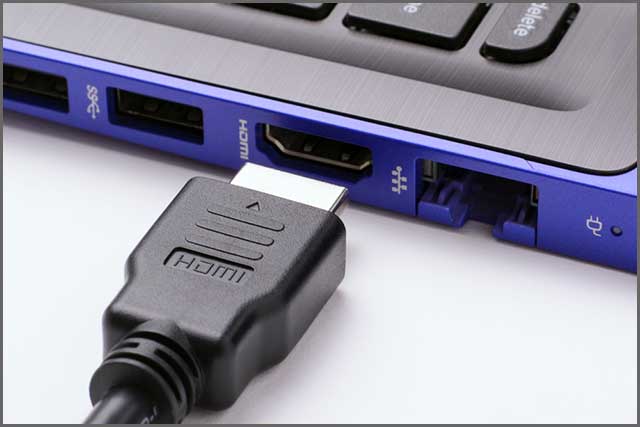
We have previously explored the world of HDMI, short for High Definition Multimedia Interface. It is an industry-standard technology that grants users access to high-quality, reliable, and high-speed transfer of both audio and video signals. HDMI cables are favoured for their ease of use, affordability, and crucial ability to encrypt data, thus ensuring digital integrity.
In this deep dive, we shift our focus to the smallest yet fully capable member of the family: the Micro HDMI cable.
Chapter 1: Micro HDMI Cable
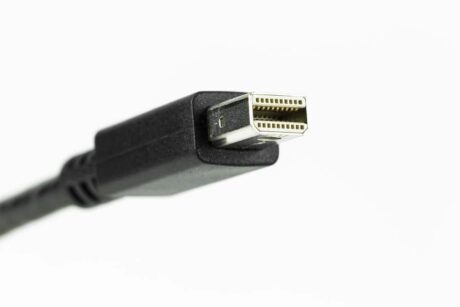
Micro HDMI Cable
1. Some Key Facts About HDMI Cable Technology
The HDMI standard, first launched in December 2002, has continuously evolved to keep pace with rapidly changing audio and video formats. Key statistics highlight its pervasive influence:
HDMI cables are available in numerous versions and types to match specific bandwidth and feature requirements.
The market is experiencing steady growth, estimated at a rate of around 5.3% annually.
The standard exists in four distinct connector sizes to suit various applications.
HDMI 2.1 is the current performance leader, supporting cutting-edge features.
Customized solutions, including cables with or without an integrated Ethernet channel (HEC), are widely available.
2. What is a Micro HDMI Cable (Type D)
The Micro HDMI connector, officially designated as HDMI Type D, is a significantly scaled-down version of the standard HDMI interface.
Size and Pinout: The Micro HDMI connector measures approximately 6.4 mm x 2.8 mm, making it about 50% smaller than the standard Type A connector. Despite its diminutive size, it retains the full 19-pin configuration (albeit with a different, more compact layout), ensuring that it carries the exact same signal quality and transmission capabilities as its larger siblings.
Functionality: This technology successfully combines uncompressed digital audio and video into a single digital interface. Its size was tailor-made for smaller, space-constrained portable electronics, enabling users to seamlessly connect mobile phones, smaller tablets, and similar devices to any HDMI-compatible display.
Performance: A Micro HDMI cable supports uncompressed digital A/V, and depending on the cable’s High-Speed or Ultra High-Speed certification, it can handle bandwidths up to 18 Gbps (for Premium High-Speed) or even 48 Gbps (for Ultra High-Speed/HDMI 2.1).
3. Different Types of HDMI Cables and Connectors
Understanding the different types ensures you select the correct cable for your specific resolution and feature requirements.
| Cable Type (By Performance) | Optimized for HDMI Versions | Max Bandwidth (Typical) | Max Resolution Support | Key Feature Support |
| Standard | 1.0 – 1.2a | 5 Gbps | 1080i / 720p | Basic HD |
| High-Speed | 1.3 – 1.4a | 10.2 Gbps | 4K (30Hz) / 1080p | 3D, Deep Color |
| Premium High-Speed | 2.0/a/b | 18 Gbps | 4K (60Hz), Ultra HD | HDR (High Dynamic Range), expanded colour gamut |
| Ultra High-Speed | 2.1 | 48 Gbps | 8K (60Hz), 4K (120Hz), 10K | eARC, VRR, ALLM, Low EMI |
| Automotive | Standard/High-Speed | Varies | Varies | Extra shielding for protection against vehicle electrical interference. |
Note 2: HDMI Connector Types
Choosing the correct connector type is vital to avoid port damage and ensure functionality:
Type A (Regular Size): The most common connector, used for large devices like HDTVs, gaming consoles, PCs, and home theatre receivers.
Type C (Mini Size): A smaller connector frequently found on standard-sized tablets and DSLRs.
Type D (Micro Size): The subject of this article, used on smartphones, high-definition camcorders, and smaller portable devices.
Type E (Automotive): A locking connector system designed for the harsh vibrations and heat of the automotive environment.
Micro HDMI and Mini HDMI cables typically feature the small connector (Type D or C) on one end and the standard Type A connector on the other, allowing connection to a large display.
Chapter 2: Who Needs a Micro HDMI Cable?
Anyone who owns a device where space is at a premium yet requires robust, high-bandwidth video output will need a Micro HDMI cable.
Device Users: Owners of GoPro action cameras, DSLR cameras (for live monitoring), smaller tablets, and older-generation smartphones that feature the Micro HDMI port.
Versatile Connectivity: The cable allows users to bypass the small screen and directly mirror their device’s content onto a bigger display (HDTVs, computer monitors, video projectors).
Practical Applications:
Family Entertainment: Easily sharing photos and videos taken on a mobile device with family and friends on a television.
Remote Communication: Using a tablet for video calls and enjoying the display on a larger screen without the need for additional complex software installation.
Professional Use: Photographers and videographers connecting a camera to a field monitor for real-time, high-quality previewing.
Chapter 3: However, Why Invent Micro HDMI Cables
The Micro HDMI cable is a direct answer to the relentless consumer demand for greater portability and thinner devices.
Manufacturers are constantly looking for ways to reduce component size to make products lighter and easier to handle. Just as traditional USB ports were replaced by the smaller, faster Type C standard, the bulky Type A or even Type C connectors had to be replaced by the Micro HDMI connector to conserve precious internal space.
By shrinking the physical port, manufacturers can dedicate more internal volume to essential components like batteries or processors, thus advancing the portability of modern electronics without sacrificing high-quality multimedia output.
Chapter 4: Benefits of a Cable
The advantages of using a Micro HDMI cable are functionally identical to those of a standard HDMI connection, but packed into a micro form factor:
Uncompromised Quality: Delivers the same excellent-quality, uncompressed digital audio and video, resulting in sharp, bright images.
Data Security: Supports encrypted data transfer, providing a safe option for handling sensitive digital content.
Signal Integrity: Highly effective at maintaining signal integrity over standard lengths.
Consumer Electronic Control (CEC): Facilitates communication between two connected devices, streamlining control functions (e.g., turning on the TV when the source device starts).
Two-Way Communication: HDMI intrinsically allows two-way communication, enabling the cable and devices to negotiate and automatically select the best audio and video formats for the connected display.
Wide Format Support: Supports numerous formats, including 1080p, 1080i, NTSC, PAL, and standard stereo audio.
Chapter 5: HDMI Cable and Conversions
One of HDMI’s great strengths is its compatibility and ease of conversion to other signal types using appropriate adapters or dedicated cables:
HDMI to VGA: This conversion is necessary to connect a modern HDMI source (digital) to an older monitor with only a VGA (analog) input. Note that this requires an active adapter to convert the signal type.
HDMI to USB Cable: This typically involves a USB-to-HDMI adapter with included driver software, allowing a computer to treat the display device as a readable output source via a USB port, often used for simple screen mirroring or extending.
HDMI to DisplayPort Cable: This conversion can be more complex. As HDMI uses TMDS signaling and DisplayPort uses LVDS signaling, most passive cables are incompatible. An active adapter or cable is often required for reliable bidirectional conversion.
Chapter 6: Things to Consider When Buying a Micro HDMI Cable
Given the proliferation of manufacturers, discerning the right product is crucial for reliability and longevity, especially with smaller, more delicate connectors.
Quality and Certification Foremost:
Always verify that the cable comes from a manufacturer known for quality and adherence to strict safety and production standards.
Look for official HDMI Premium Certification or Ultra High-Speed Certification labels to guarantee advertised bandwidth and features (especially for 4K/HDR or 8K).
Precise Requirement Mapping:
Determine the exact required cable length. Longer cables (especially over 5 meters) may experience signal degradation, necessitating thicker gauges or active optical solutions, which impacts cost.
Clarify the device compatibility, as some newer portable devices have transitioned to USB-C ports with Alt Mode instead of Micro HDMI.
Future-Proofing and Upscaling Options:
While your current device may only support 1080p, selecting a Premium High-Speed (18 Gbps) or Ultra High-Speed (48 Gbps) Micro HDMI cable ensures you can utilize the full potential of a 4K or 8K display should you upgrade the source device in the future.
Chapter 7: Where Can I Buy a Custom Micro HDMI Cable from?
While off-the-shelf cables serve most needs, specialized applications—such as industrial systems, bespoke camera rigs, or integrated commercial displays—often require customized lengths, specific jacket materials, or unique connector orientations.
For Custom Solutions: Companies like Grace, based in Dongguan Guangdong, China, specialize in catering to clients worldwide, offering custom-designed HDMI cables and other connectivity solutions at competitive rates. Their expertise in manufacturing ensures the bespoke products adhere to the same high-quality and safety standards as mass-market options.
Conclusion
The Micro HDMI cable, or Type D, is a testament to the industry’s ability to maintain high performance in increasingly compact hardware. By understanding its specifications, proper use cases, and the necessary quality certifications, consumers and businesses can ensure they select the best Micro HDMI cable for seamless, high-definition connectivity.
Contact Grace for your project now.